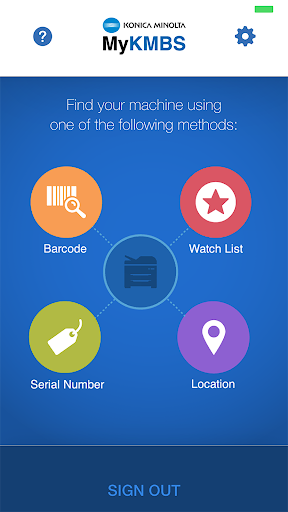
MyKMBS is the essential companion app for every Konica Minolta customer. Designed to simplify your workflow, this app gives you convenient, on-the-go access to everything required to maintain your Konica Minolta multifunction devices. With just a few taps, you can schedule service requests, order supplies specific to your machine model, submit meter readings, and review usage history. MyKMBS stands out by offering multiple ways to identify your device—scan its barcode or use GPS location services. This flexible, user-friendly app serves as the perfect mobile alternative to the MyKMBS portal, delivering a smooth and connected experience.
MyKMBS Key Features:
* Convenient, Fast Access: The app provides a quick and easy way for Konica Minolta customers to handle all aspects of device maintenance. From your mobile device, simply tap to schedule service calls, order model-specific supplies, enter meter reads, view meter history, and access helpful resources—all in one place.
* Flexible Device Identification: Identify your Konica Minolta device using several methods, including barcode scanning and GPS location. This ensures fast, accurate linking of your machine so you can access relevant tasks and information without delay.
* Simplified Service Scheduling: Streamline service support by scheduling service calls directly within the app. Avoid phone calls or emails—request assistance with a few taps and receive prompt service to keep your devices running smoothly.
* Effortless Supply Orders: Ordering genuine supplies for your machine is straightforward. Browse the catalog, select the items you need, and place your order through the app for direct delivery. This keeps your supplies replenished, reduces downtime, and supports continuous productivity.
User Tips:
* Use Barcode Scanning: For the fastest way to link your device, use the app’s barcode scanner. Point your smartphone camera at the barcode on your Konica Minolta machine, and the app will instantly recognize it and connect it to your account.
* Activate Location Services: To use the GPS-based identification, ensure location services are enabled on your device. This allows the app to detect your location and offer machine-specific options relevant to your site.
* Update Meter Reads Regularly: Maintain accurate records of your machine’s usage by submitting meter reads through the app on a regular basis. This helps you stay ahead of maintenance, ensures correct billing, and can reveal potential savings.
In Summary:
The MyKMBS app delivers a convenient, efficient mobile platform for Konica Minolta customers to manage their multifunction devices. Through multiple identification options, streamlined service scheduling, and simple supply ordering, it simplifies essential tasks—saving time and boosting productivity. By using barcode scanning and GPS features, users can effortlessly link devices to their accounts for personalized access. Regular meter reading updates support accurate billing and help optimize maintenance cycles.