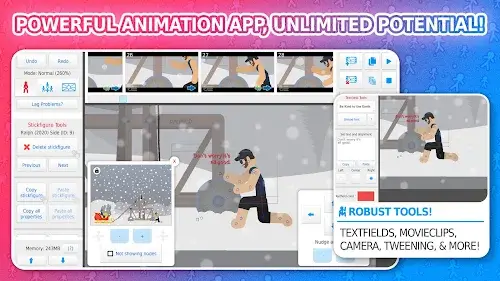
Stick Nodes is a powerful stickman animation app designed for mobile, perfect for animators at any skill level. Inspired by the classic Pivot stick figure animator, it lets you easily produce stick-figure movies with tools like image importing, auto frame-tweening for fluid motion, and a flexible camera system. A standout feature is Movieclips, which lets you reuse animated objects efficiently. The app also supports a lively community, providing access to over 30,000 downloadable stick figures on its official site. With multilingual support, compatibility with legacy Pivot files, and recent integration as a Minecraft™ animator, Stick Nodes is a top choice for creating fun and inventive stick figure animations.
The Art of Movieclips
Among stickman animation apps, Stick Nodes excels with its revolutionary Movieclips feature. This tool transforms the animation workflow and distinguishes Stick Nodes from competitors. Here’s how Movieclips make a difference:
- Enhanced efficiency: Movieclips simplify animation by letting you reuse animated elements, saving valuable time and effort.
- Simplify complex animations: Achieve detailed animations effortlessly by integrating sophisticated movements and interactions with movie clips.
- Unleash creativity: Broaden your creative horizons by experimenting with various animation components, expanding the potential of stick figure animation.
- Maintain project consistency: Reusing Movieclips ensures a uniform style and behavior, giving your animations a refined and professional finish.
- Streamline collaboration: Make teamwork smoother by crafting and sharing Movieclips, encouraging a collaborative spirit among animators.
- Explore endless animation options: Movieclips unlock new creative pathways, allowing animators to design dynamic and engaging stick figure animations.
Additional Advanced Capabilities
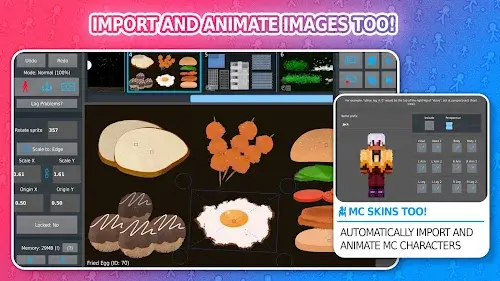
- Import and animate images: Stick Nodes goes beyond stick figures, enabling you to import and animate images. This opens up endless creative opportunities, letting you include various visuals in your projects.
- Smooth animations with frame-tweening: The app features automatic, customizable frame-tweening to ensure seamless animation flow. This is crucial for achieving high-quality, professional-looking results, making Stick Nodes a favorite for smooth animation.
- Dynamic camera controls: Like Flash’s “v-cam,” Stick Nodes has an intuitive yet robust camera for panning, zooming, and rotating scenes. This adds dynamism to your animations and improves visual storytelling.
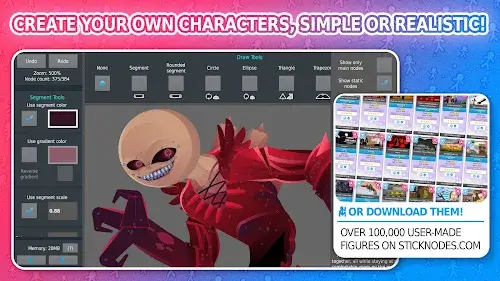
- Extensive stick figure customization: With options for shapes, colors, scaling per segment, gradients, and more, the app offers unmatched stick figure personalization. Bring any stick figure idea to life with endless creative choices.
- Textfields and sound effects: Use textfields to easily add text and dialogue to animations, while sound effects introduce extra energy, making your animations more lively and engaging.
- Diverse filters for visual polish: The app includes multiple filters for stick figures, such as transparency, blur, and glow, enhancing visual appeal and adding creativity to each frame.
- Thriving community and stick figure library: A vibrant community hub lets animators connect, share, and collaborate. With over 30,000 downloadable stick figures, Stick Nodes offers a huge resource pool to spark and support your creativity.
- Multilingual support: Stick Nodes appeals to a worldwide audience by supporting languages like English, Spanish, French, Japanese, Filipino, Portuguese, Russian, and Turkish.
Minecraft™ animation integration: A recent update lets Stick Nodes function as a Minecraft™ animator. You can import Minecraft™ skins and animate them easily, widening your creative scope.
In summary, Stick Nodes: Stickman Animator is a leading mobile animation app. Its easy-to-use interface, rich features, and supportive community make it excellent for newcomers and experts alike. Express your creativity, share your stories, and animate your stick figures with Stick Nodes!