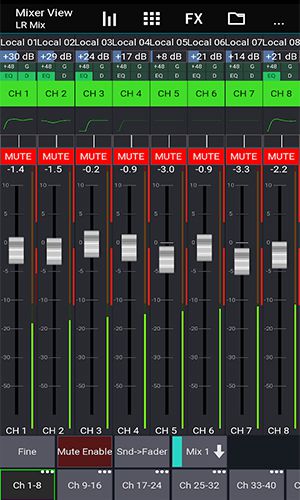
About Mixing Station: A Fully Customizable User Interface. You can create unlimited DCA groups (IDCAs), customize layers, layouts, channel orders, and apply multi-group labels. View an RTA overlay in PEQ and GEQ modes. Utilize channel linking and relative ganging for unified control. Track gain reduction history for gate and dynamics processors. Benefit from peak hold on all meters with adjustable hold times. Preview PEQ adjustments directly in the channel strip. A high-contrast mode enhances visibility outdoors. Quickly access channel groups with Popgroups. Configure signal flow with a comprehensive routing matrix. Support for up to 32 channels per layer. Easily copy mix settings. Employ feedback detection to help ring out wedges and monitors. Access to further features depends on your specific connected mixer model. In conclusion, Mixing Station is a comprehensive solution for modern audio mixing.
Mixing Station is a robust mixing application that equips users with a suite of features to streamline and enhance the audio mixing workflow. Beyond the capabilities previously outlined, the app includes several advanced tools that solidify its position as an indispensable resource for live sound engineers, studio producers, and performing musicians.
About Mixing Station
Fully customizable UI
The user interface in Mixing Station is completely adaptable, enabling you to design custom layouts, layers, and channel arrangements. This puts your most-used controls at your fingertips and tailors the workspace to your specific needs.
Create unlimited DCA groups (IDCAs)
Create as many DCA groups (IDCAs) as required for your session. This is ideal for live sound, allowing you to adjust the levels of multiple channels simultaneously and respond quickly to changing mix demands.
Customizable layers, layouts, channel order and multi-group labels
Organize your session efficiently by customizing layers, layouts, channel sequences, and group labeling. Clear organization minimizes errors and speeds up your workflow during complex projects.
RTA overlay in PEQ /GEQ view
An integrated Real-Time Analyzer (RTA) overlay within the PEQ and GEQ views provides a visual guide to frequency content, helping you pinpoint and correct problem frequencies with precision.
Channel linking and relative ganging
Link channels together or create relative ganging groups to adjust multiple parameters at once. This ensures consistent changes across related channels, maintaining a balanced mix.
Gain reduction history for gate and dynamics
A dedicated gain reduction history display for gates and dynamics processors lets you visualize compression activity over time, aiding in the fine-tuning of these crucial effects.
Peak hold for all meters, editable hold times
All level meters feature a peak hold function with configurable hold times. This makes it easy to monitor signal peaks and prevent clipping or distortion, even when you're not looking directly at the meter.
Peq preview in channel strip
Audition your parametric EQ (PEQ) adjustments in real-time with an in-strip preview function before committing them to the channel, ensuring you achieve the perfect tonal shape.
High contrast mode for outdoor usage
The high-contrast display mode improves screen readability in bright outdoor conditions, reducing eye strain and making the app usable in any environment.
Popgroups
With Popgroups, assign channels to instant-access groups that can be unmuted with a single tap. This is a powerful tool for live shows where rapid changes to monitor mixes or effects are needed.
Routing Matrix
Manage complex audio signal paths with an intuitive routing matrix. Route any source to any destination, simplifying the setup of buses, aux sends, and matrix mixes.
Up to 32 channels per layer
Each layer supports up to 32 channels, providing ample capacity for a wide variety of mixing scenarios, from simple podcast setups to complex live productions.
Mix copy
Quickly duplicate complex mix settings from one scene or show file to another using the mix copy function. This accelerates setup time and maintains consistency across projects.
Feedback detection for ringing out wedges
A dedicated feedback detection tool assists in the process of ringing out monitor wedges and in-ear monitor systems, helping you achieve a clear, feedback-free monitor mix faster.
More features available depending on the connected mixer model
Your access to features expands based on the connected digital mixer model, unlocking deeper integration and mixer-specific controls for a fully tailored experience.
Conclusion
Mixing Station is a powerful, adaptable, and comprehensive mixing application packed with features that elevate efficiency and creative control. Its strengths—like the fully customizable interface, advanced channel management tools, visual RTA analysis, detailed dynamics metering, and environment-aware display options—combine to form a top-tier mixing solution.